

The point.
- Your bank statement is the master list: three months of statements catches the monthly and quarterly charges, even the ones you forgot; anything billed yearly needs a full twelve.
- There are three ways to make a charge stop: cancel with the provider, stop the recurring card payment, or cancel the SEPA direct debit.
- Stopping the payment is not the same as ending the contract. Only cancelling with the provider closes the contract and your duty to pay.
- EU rights tilt the table your way: an eight-week no-questions SEPA refund (13 months if there was no valid mandate) and a 14-day online cooling-off right, with streaming you have started as the exception.
Your monthly bill feels bigger than it should, and you can’t say why. That isn’t you being careless. Signing up takes one tap. Cancelling? A maze, built on purpose, so small charges keep slipping out month after month while you forget they exist.
So let’s go and find them. A subscription audit is a 30-minute job with a clear finish line. By the end of this guide you’ll know three things: where the full list lives, the three ways to make a charge stop, and a couple of EU rights most people have never heard of. No shame, no lecture. Just the money back.
What is a subscription audit, and why do I need one?
A subscription audit means sitting down once, listing every recurring charge that leaves your account, and deciding which ones to keep. You find the leaks, then you plug them. The whole job takes about 30 minutes and pays you back in money you stopped noticing.
You almost certainly have a few. A 2024 study of 5,000 European subscribers by the payments firm Bango (opens in new tab) found people hold around three subscriptions each and spend hundreds of euros a year on them. A 2024 YouGov survey (opens in new tab) put it more bluntly: more than half of subscribers pay for at least one service they never use. Treat those as study findings, not gospel. The point stands either way. Some of your money is going somewhere you stopped caring about.
Here’s why it builds up so quietly. Two small ones feel like nothing. Netflix Standard is €14.99 a month. Spotify Premium is €12.99 a month in Germany. That’s already about €28 a month, or roughly €336 a year, from two services you barely think about. Add a third you forgot, and the number stops being small. Quietly, it grows. (Prices are current at the time of writing and do drift, so check your own.)
It adds up faster in some places than others. The same Bango study put the yearly spend at around €780 in France, €720 in Spain, €684 in Germany and €600 in Italy. Wherever you live, the lesson is the same: a few euros a month, times a year, times services you forgot, is real money. A subscription audit is how you get it back.
These charges hide for a dull but useful reason. On your statement, a charge often shows up under a billing firm, an app store, or a payment company, not the name of the thing you signed up for. So a forgotten subscription becomes just a line you no longer recognise. A subscription audit is how you spot it again.
How do I find all the subscriptions I’ve forgotten about?
Start with the only list that never lies: your bank statement. Every recurring charge has to leave your account, so a few months of statements gives you an honest record of everything billed monthly or quarterly, even the ones you forgot. Here’s the whole subscription audit in five steps.
- Pull up the last three months of your bank and card statements, or a full twelve if you are hunting annual renewals.
- List every charge that repeats, and write the euro amount next to each.
- Check your banking app’s “recurring payments” or “subscriptions” view, if it has one.
- Cancel the ones you don’t want, directly with the provider.
- If a charge still won’t die, tell your bank to stop the direct debit.
That’s the whole subscription audit. The rest of this guide is detail on steps four and five, because that’s where people get stuck.
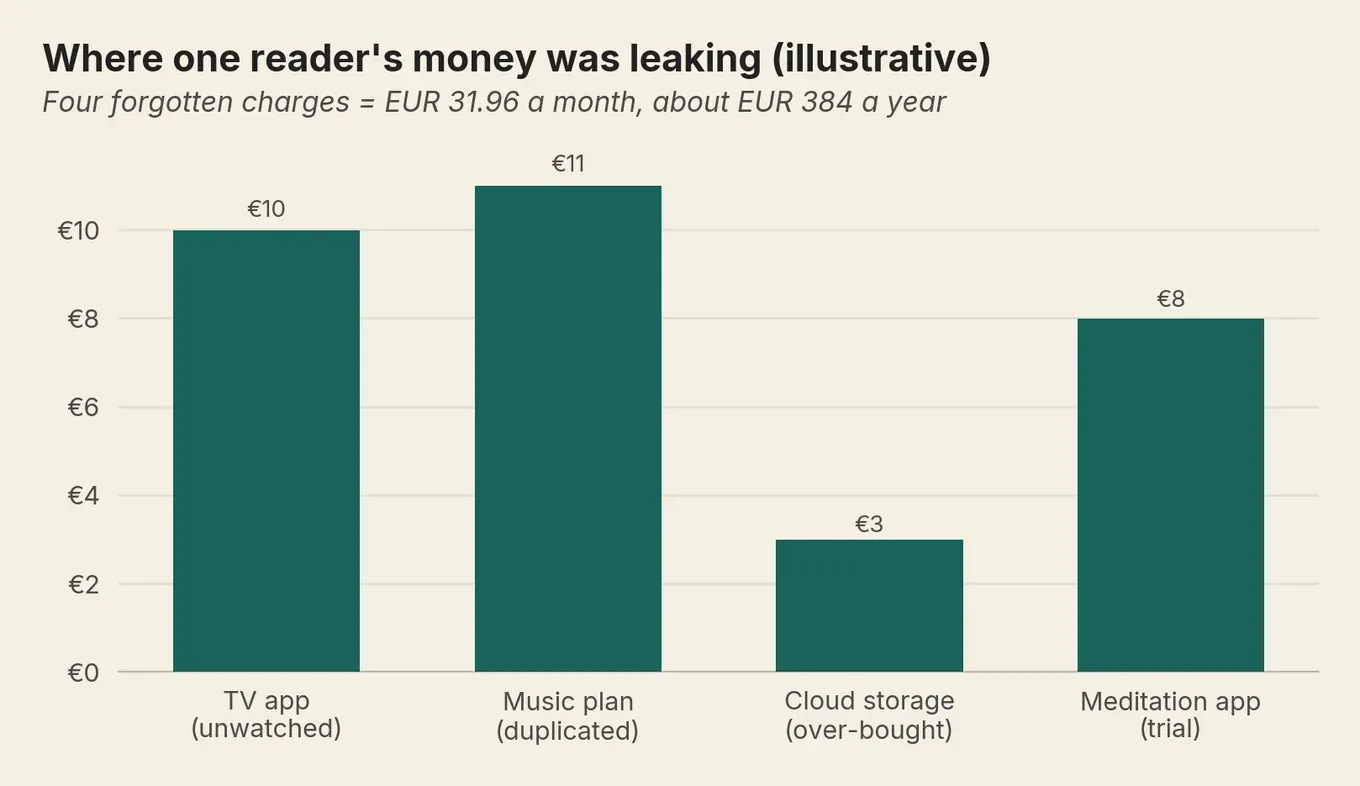
Here’s how that looks for one reader. Lieke in Rotterdam pulled three months of statements one evening and found four charges she’d stopped noticing: a TV app at €9.99 a month, a music plan at €10.99 she already had through her household, €2.99 for cloud storage she’d over-bought, and a €7.99 meditation app from a trial she forgot to cancel. That’s €31.96 a month, just under €384 a year. She cancelled all four directly with the providers, kept the confirmation emails, and watched her next statement to confirm each one had stopped.
Why does the bank statement beat my memory?
Because the statement records the charges you forgot. Three months of statements catches the monthly and the quarterly ones in one pass. Go line by line and flag anything that comes round again.
The honest test for each one: when did I last use this? If you can’t remember, it goes on the cut list.
Will my bank app group the subscriptions for me?
Often, yes. Under EU “open banking” rules (which let you allow an app to read your bank transactions), many EU bank apps now group your recurring payments for you. It saves time, but it misses some charges.
Revolut, N26 and bunq all show a view like this, and plenty of traditional banks do too. Treat it as a head start, then check it against your statements.
Why do I need to check my app store too?
Because some subscriptions are billed through Apple or Google, and deleting the app does nothing to them. They live in your store account, not the app, so a bank-level stop won’t reach them cleanly.
On an iPhone, Apple (opens in new tab) tells you to go to Settings, tap your name, then Subscriptions. On Android, the same lives in the Play Store account. Started a free trial? This is where you cancel it before it quietly flips to paid.
How do I cancel a subscription cleanly so the charges stop for good?
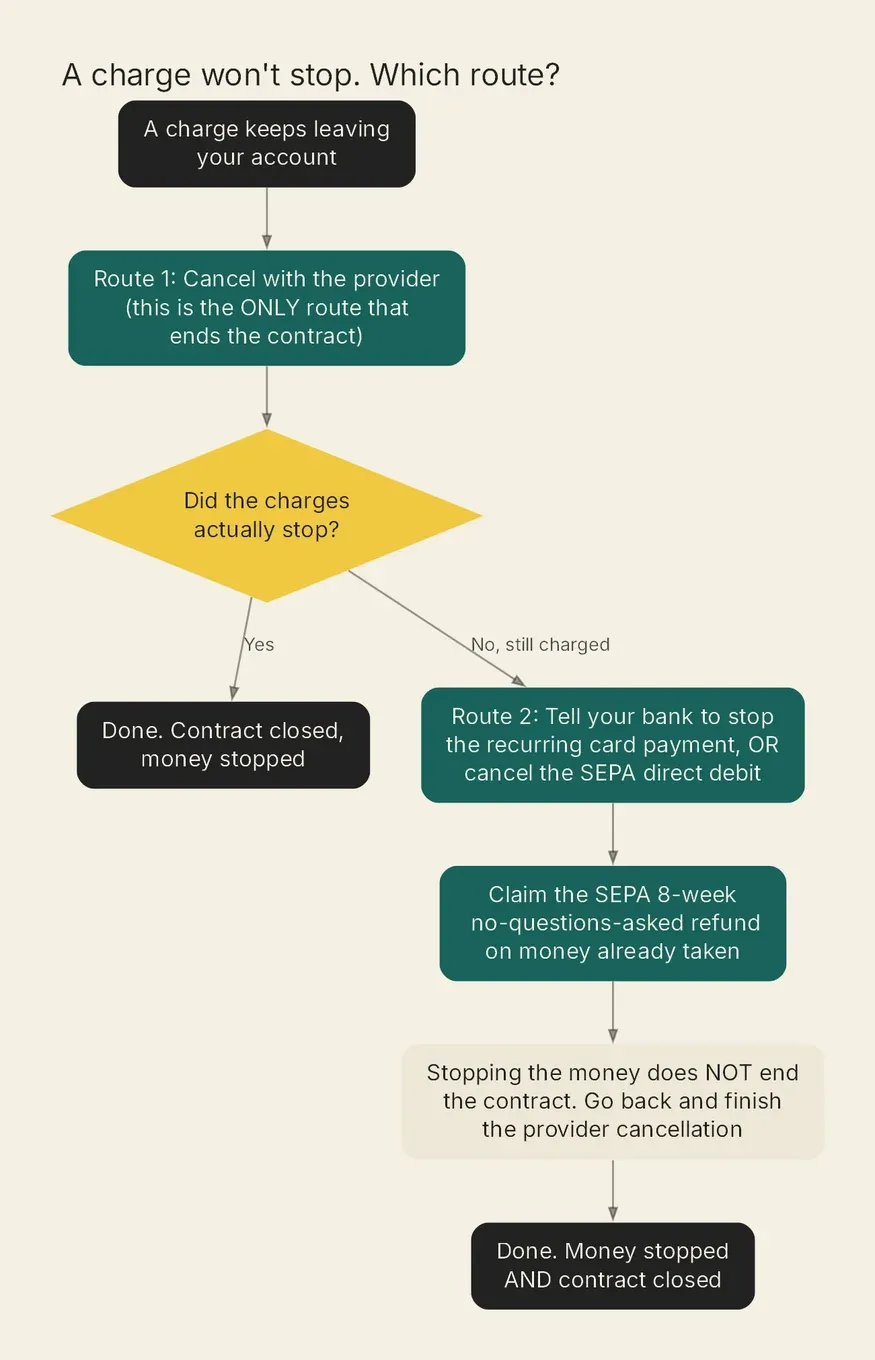
The clean way to cancel unwanted subscriptions is to cancel with the provider itself. You log in, you find the cancel button, you confirm. This route alone ends your contract and your duty to pay. Everything else in this guide only stops the cash, which is a different thing, and a trap worth understanding.
Hold on to that line, because it carries the whole guide: stopping the payment does not equal ending the contract. You can switch off the money and still owe it.
So always try the provider first. Cancel in your account settings, or for an app-store subscription, cancel in the store account. Expect some friction. There’ll be extra screens, an “are you sure?” loop, maybe a discount thrown at you to stay. That friction is the design, not your fault for missing the button. Click through it.
One really time-sensitive case: free trials. Most “free” trials are a paid subscription with a delayed first charge. They auto-convert unless you cancel first. Apple’s (opens in new tab) own rule is to cancel at least 24 hours before the trial ends. That figure is an Apple App Store rule, not an EU law, and other stores set their own. The safe habit is to cancel a few days early rather than cut it fine.
Sometimes the clean route isn’t enough. Picture a reader in Madrid who cancels a streaming app, gets the “your subscription has ended” email, and then watches the same €9.99 leave her account a month later. She did everything right. The provider charged her anyway. Maddening. This happens more than it should, and it points straight at the next part. When the provider won’t stop, you take it to your bank, the move no one tells European readers about.
How do I stop a recurring card payment or direct debit with my bank?
When the provider won’t stop charging you, your bank can. How you do it depends on how the subscription pulls the money, and there are two main pipes. A recurring card payment means the company stored your card and charges it on a schedule. A SEPA direct debit (the standard European way a company pulls money straight from your bank account) means you signed a mandate (the permission slip) that lets the company take it. They’re stopped in different ways.
How do I stop a recurring card payment?
You tell your bank to stop it, and the payment loses its authorisation. Under the EU’s payment services rules (opens in new tab), you can withdraw consent to a series of payments at any time, and once you do, every future charge counts as unauthorised. You do not have to contact the company first. That is the same across the EU, because it is one EU rule sitting behind every national one.
Anything taken after you cancel counts as an unauthorised charge the bank should refund. Two things to remember. First, tell the bank before the next charge is due, because it cannot un-take a payment that has already gone. Second, and this is the trap, stopping the card does not end your contract. It is still your job to pay any money you owe. So treat the card-stop as a backstop, not your only move.
How do I cancel a SEPA direct debit?
A direct debit gives you two levers, and your bank hands you both. You cancel the mandate at your bank, and you claim a refund on money already taken. But there’s a catch the bank itself warns about.
Bank of Ireland (opens in new tab), as a scheme operator, spells it out in its own words: you must also tell the company whose direct debit it is, or it can keep trying to collect. Cancelling at the bank doesn’t tell the provider, and it doesn’t end the contract. So do both: cancel the mandate, and tell the company.
What EU refund and 14-day rights do I have?
Two of them, and they tilt the table your way. You get a refund window on a direct debit, and a short cooling-off right when you sign up online. These rights apply EU-wide, so they work the same whether you bank in Dublin, Madrid, Lisbon or Ljubljana.
The first lever is the part the US guides can’t offer you: a refund window on a direct debit. The European Payments Council (opens in new tab), which owns the rulebook, lets you claim your money back, no questions asked, for eight weeks after an authorised direct debit. If the company never had a valid mandate in the first place, that window stretches to 13 months. One exception worth flagging: a business-to-business direct debit, paid from a business account, carries no such refund right.
Aoife in Galway used exactly this. She cancelled a fitness-app subscription, got the “you’re all set” email, then watched a €14.99 direct debit leave her account a month later. Arguing with the app wasn’t her move. Instead she went to her bank and used the SEPA refund right: for eight weeks after a direct debit you OK’d, you can claim the money back, no questions asked. The €14.99 came back. Then her bank flagged the part that catches people out: cancelling the mandate stops the money, but it doesn’t end the contract. So Aoife went back to the provider, finished the cancellation properly, and kept the confirmation. Money stopped, and contract closed.
The second lever, the cooling-off right. Under the EU Consumer Rights Directive (opens in new tab), if you signed up online, you usually get 14 days to walk away, no reason needed. But here’s the catch you have to know. For streaming or other digital content you start using straight away, you usually agree to give up that right the moment you press play. Your Europe (opens in new tab), the European Commission’s own guide, confirms it: a film you started streaming after agreeing to lose the right falls outside the 14 days. So the walk-away works for a subscription you haven’t started. For a service you have already watched, the right is gone, and you fall back to the routes above.
There’s a third lever, and it works in your favour before you even cancel: a provider cannot bury the renewal terms. The European Consumer Centre Germany (opens in new tab), part of the EU-funded ECC-Net network, spells out the duty:
“Throughout the EU, the supplier must inform you in a clear and comprehensible way about the duration of the subscription, notice periods and automatic renewals.”
These rights are levers, not guarantees. The bank still checks an unauthorised claim. But knowing they exist is what turns “I can’t make it stop” into “I know exactly what to do next”. Want more ways to take the slow leaks out of your budget? The envelope system and our guide to short-term versus long-term saving goals both build on the money you just freed up. And rather than letting those reclaimed euros sit idle, a high-yield savings account is a sensible home for them.
What is the best app to find and cancel my subscriptions?
A subscription manager app helps you find subscriptions. None of them ends the contract for you. Keep that in mind before you hand any app access to your bank data. Most EU bank apps now offer a view of your recurring payments, built on the same open-banking rules. They shine at discovery and stumble at cancelling, and they’re honest about it.
Take Revolut (opens in new tab), the clearest example. Its app shows your subscriptions and lets you block a payment to a merchant. But its own help page says it straight: blocking a subscription in the app does not cancel the subscription. You still have to contact the company. That’s the rule for every tool here, not a quirk of one bank.
| Tool | Shows your subscriptions? | Stops a payment in-app? | Ends the contract? |
|---|---|---|---|
| Revolut | Yes | Yes (block the payment or merchant) | No |
| N26 | Yes (view and track) | No | No |
| bunq | Yes (view and track) | No | No |
| Your bank via open banking | Varies | No | No |
So use an app for what it’s good at: spotting the charges you forgot. For the stopping, you’re back to the three routes above. There’s a real trade-off here too. An app that reads your transactions needs access to your bank data, and that’s a choice only you can make. A spreadsheet and three months of statements does the same discovery job with no one else looking. Neither is wrong.
A last word on timing, since the most common question has no clean answer: how often should you do this? There’s no rule and no regulator number. Once or twice a year is plenty for most people. Do it when your bill feels heavy, or set a date you’ll remember, like the start of the year. Treat it as a habit, not a test you keep failing.
That’s the whole job. You found the list, you stopped the leaks, and you know your rights if a charge refuses to die. None of it is clever, which is exactly the point. Run the audit, claw back the euros, and go and spend the time you saved on literally anything else. If money worry is the thing keeping you up rather than the money itself, our piece on staying financially resilient is a kinder place to start.
Frequently asked questions
How do I find subscriptions I have forgotten about?
Does cancelling my card stop a subscription?
Can I get my money back on a subscription I was wrongly charged for?
Does the EU 14-day cancellation right always apply?
What is the best app to find and cancel subscriptions?
How often should I do a subscription audit?
Sources (11)
- European Payments Council: SEPA Direct Debit
- EUR-Lex: Consumer Rights Directive 2011/83/EU
- Your Europe (European Commission): Returns and refunds
- EUR-Lex: Payment Services Directive (EU) 2015/2366 (PSD2), Article 64 on withdrawal of consent
- European Central Bank: The revised Payment Services Directive (PSD2)
- Bank of Ireland: SEPA Direct Debit services
- European Consumer Centre Germany (EVZ): Online subscriptions
- Revolut Help: Subscriptions
- Apple Support: View, change or cancel your subscriptions
- Bango: Europeans now spend almost EUR 700 on subscriptions every year (commercial survey, attributed)
- YouGov: Subscription graveyard survey (attributed)
— That's the lot. It is now night.
Want more of this in your Google results?
Add Money Owl as a preferred source, and Google will show our finance pieces higher when you search for them.
By Jure Jaklič
Founder and editor of Money Owl. Data analyst by trade; personal finance learned first-hand across six European countries.
Recommended

How to audit your spending and find where it went
A bank statement is a diary you didn't mean to keep. Here's how to read it back and find where the money actually went.
The payday running order: what to do when you get paid
The euro payment system shuts four days straight every Easter. Move the payments nobody else is waiting for to at least five days after payday, on a date at or below the 28th that your own bills have already cleared.
How much should you have saved by 30, 40 and 50? The European answer
One year's salary by 30, three times by 40. That rule is American, and it assumes you fund half your own retirement yourself. Most of Europe already funds more, and most countries have a free government site where you can look yours up.